As a Cloud Marathoner, continuous learning is part of the journey. Recently, I renewed my Microsoft 365 Certified: Teams Administrator Associate certification, and I want to share the experience so you can prepare for yours.
Why Renewal Matters
Microsoft certifications are valid for one year, and renewal ensures your skills stay aligned with the latest updates in Microsoft Teams. The renewal process is free, online, and unproctored—perfect for busy professionals who want flexibility.
Eligibility: You can renew within six months before expiration.
Assessment: A short, open-book online assessment focused on recent Teams updates.
Skills Measured:
Implement compliance for Microsoft Teams
Lifecycle management and governance
Manage external access and Teams devices
Configure Teams Phone, auto attendants, and call queues
Manage apps and collaboration experiences for chat and channels
Attempts: Unlimited until expiration, with a 24-hour wait between retakes.
Validity: Passing extends your certification by one year.
Preparation Tips
Microsoft provides a curated learning collection (about 8 hours) to help you prepare. I recommend:
Reviewing Teams governance and compliance modules.
Practicing Teams Phone configuration scenarios.
Exploring device management and external access best practices.
Did i cleared the exam?
Well… not 100% flawlessly! 😅 While preparing for the renewal assessment, I discovered many new features and updates in Microsoft Teams—especially around management and governance. These changes reminded me that staying current is a continuous journey.
I had to catch up on several latest capabilities, and honestly, that was the most exciting part of the process. Despite all the odds, I managed to pass the assessment with a good score! 🎉
Here’s the reality check:
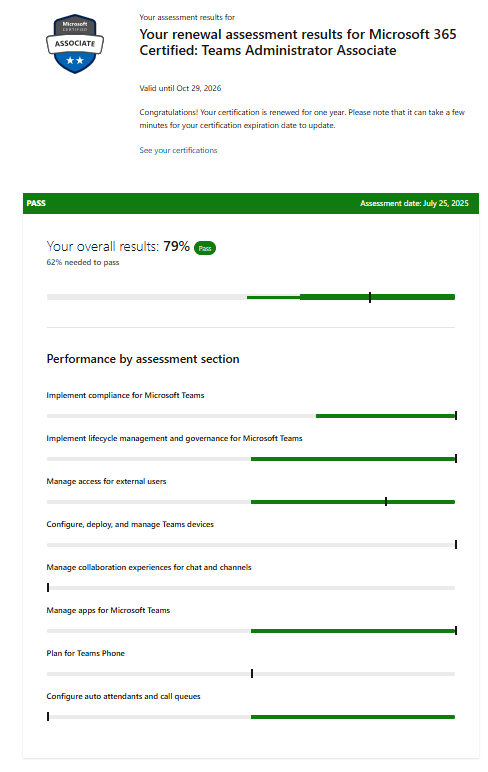
The renewal assessment highlighted areas where I need improvement.
Features like Manage collaboration experiences, advanced compliance settings and Teams phone deserve more attention in my learning plan.
And yes, I’ve got the screenshot from my exam results showing the points I should improve—because growth is all about transparency and learning forward.
Key Takeaways
Passing is great, but the real win is identifying gaps and planning your next learning sprint. That’s what makes us true Cloud Marathoners—always running toward knowledge, not just the finish line.
Are you planning to renew your Teams Admin certification soon?
Drop your thoughts in the comments or share your experience with the Cloud Marathoner community!
Greetings to all Cloud community and Cloud Marathoner friends!
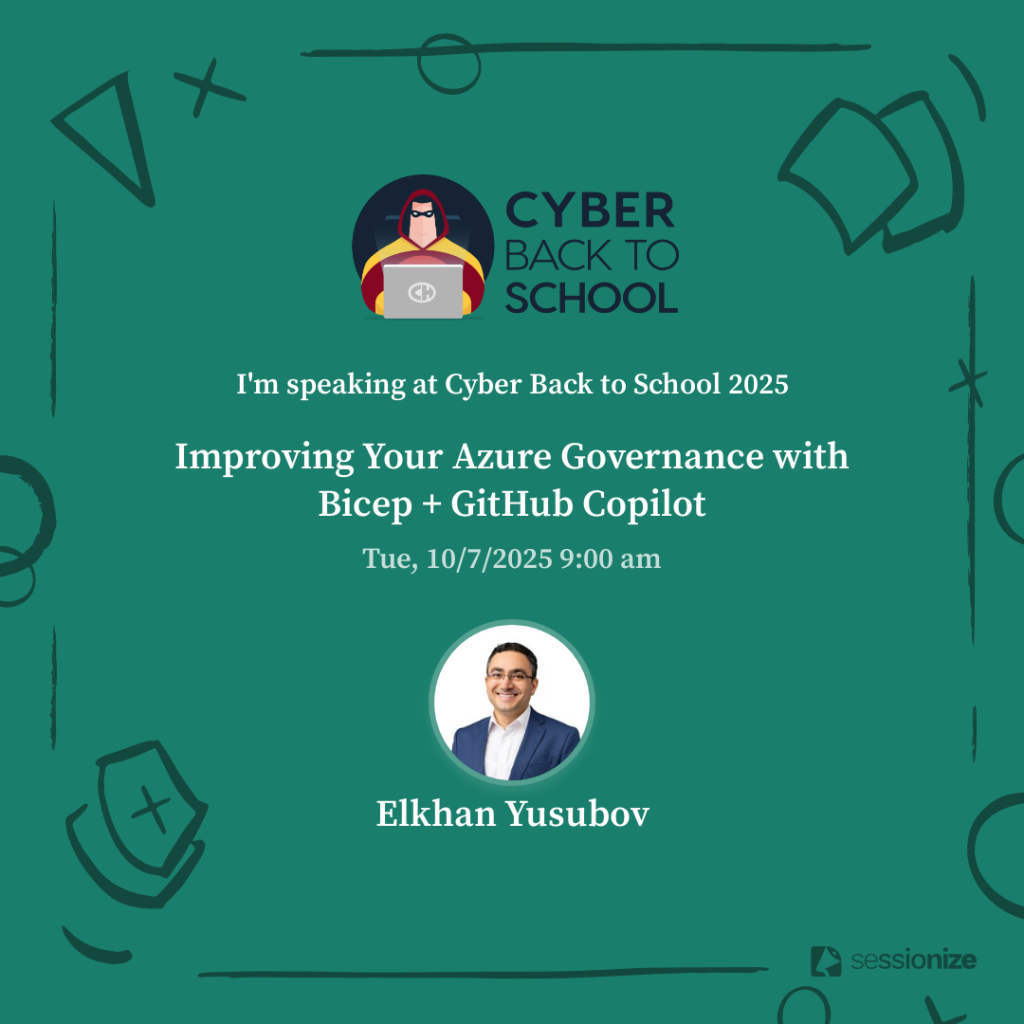
Did you know that the Cyber Back to School 2025 is started on October first? It is community organized event that you don’t want to miss out.
Cyber Back to School event
Cyber Back to School is an annual community event featuring IT professionals from across the world. This event was started in 2024 by Microsoft MVP and MCT Community Lead, Dwayne Natwick. Microsoft community Leader, Microsoft MCT, blogger, and public speaker, Derek Smith, joined the team as co-organizer in 2025. In 2025, Cloud Marathoner and Microsoft MVP and MCT, Elkhan Yusubov began assisting with social media and promotion of the event. Community members submit sessions, either videos or blog articles, to provide viewers with actionable knowledge. The event takes place every October, from 01 October to 31 October.
This year I submitted two sessions and look forward to sharing the first one on this blog below.
What is covered in my session?
Strong governance is the foundation of a secure, scalable, and cost-effective cloud environment. In this hands-on session, we’ll explore together how to use Bicep — Azure’s new infrastructure as code language —alongside GitHub Copilot to streamline and strengthen your Azure governance strategy.
You will learn the following in this session:
✅ Azure Governance: policies, role-based access control (RBAC), resource locks, and naming conventions
✅ Resource Governance rules with Bicep code
✅ GitHub Copilot to the rescue of reduce errors and follow best practices in IaC
✅ Real-world examples
✅ Automating governance at scale
✅ Tips for integrating governance into your CI/CD workflows
This session is designed for early-career cloud engineers and architects looking to build confidence in managing Azure environments with automation and AI-assisted development.
Azure Governance
As a cloud engineer or working professional stepping into the world of Microsoft Azure, one of the most important concepts to grasp early is Azure Governance. Think of it as the set of rules and practices that help organizations manage their cloud resources effectively, securely, and in a cost-efficient way. Let’s break down some of the key components of Azure Governance:
🛡️Azure Policies – Enforcing Rules
Azure Policies are like the rulebook for your cloud environment. They help ensure that resources are created and managed in a way that aligns with your organization’s standards. For example: You can create a policy that only allows resources to be deployed in specific regions (e.g., only in West Europe or East US), or that requires all storage accounts to have encryption enabled.
Why it matters? It helps prevent misconfigurations, ensures compliance, and keeps your environment secure and cost-effective.
👥 Role-Based Access Control (RBAC) – Managing Who Can Do What
RBAC is Azure’s way of controlling who has access to what resources and what actions they can perform. For example: You can give a developer access to manage virtual machines in a resource group but not allow them to delete the resource group itself.
Why it matters? It follows the principle of least privilege, ensuring users only have the permissions they need—nothing more, nothing less.
🔒 Resource Locks – Preventing Accidental Deletion or Changes
Resource Locks are like putting a “Do Not Touch” sign on critical resources. We have following types of locks:
ReadOnly – Users can read the resource but can’t make changes.
CanNotDelete – Users can modify the resource but can’t delete it.
As a use case example: You can lock a production database to prevent accidental deletion during maintenance.
Why it matters? It adds an extra layer of protection for important resources and prevents accidental changes in your important resources.
🏷️ Naming Conventions – Keeping Things Organized
Naming conventions are standardized ways of naming your resources so they’re easy to identify and manage. For example: A virtual machine name like vm-prod-weu-app01 could tell you the following additional information:
It’s a VM
Used in production
Located in West Europe
It’s an app server
Why it matters? It improves clarity, helps with automation, and makes managing large environments much easier.
🧩 Bringing It All Together
Imagine you’re building a cloud environment for a company. With Azure Governance you can achieve the following mission:
Define rules (Policies)
Control access (RBAC)
Protect critical resources (Locks)
Stay organized (Naming Conventions)
Together, these tools ensure your cloud environment is secure, compliant, and manageable—even as it grows. Mastering Azure Governance early will set you up for success as you build scalable, secure, and well-managed cloud solutions.
Resource governance with Bicep Code
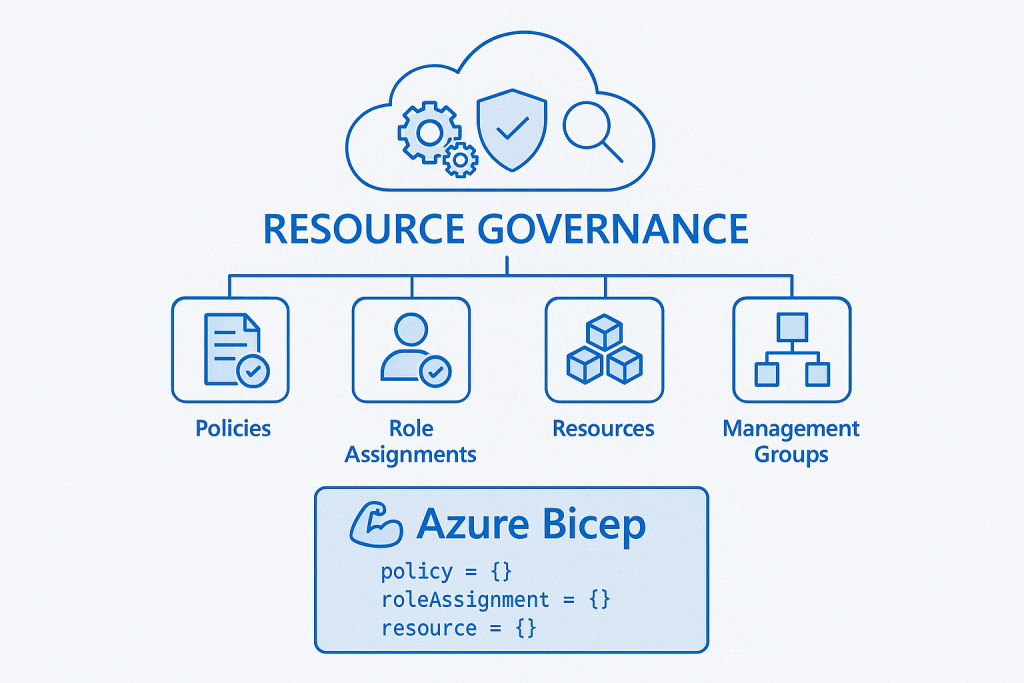
Resource governance with Azure Bicep empowers organizations to manage cloud resources consistently and securely through declarative infrastructure-as-code. By defining policies, role assignments, and resource configurations in Bicep templates, teams can enforce compliance, reduce configuration drift, and automate deployments across environments. This approach enhances visibility and control, ensuring that resources adhere to organizational standards from the moment they’re provisioned.
Additionally, Bicep simplifies governance by integrating seamlessly with Azure Policy and management groups, enabling scalable enforcement of rules across subscriptions. Its modular structure promotes reuse and collaboration, allowing teams to build standardized templates for tagging, cost management, and security controls. Ultimately, Bicep streamlines governance workflows, reduces manual overhead, and fosters a culture of accountability and best practices in cloud operations.
GitHub Copilot to the rescue
When working with Azure governance at scale, writing Bicep templates for policies, RBAC assignments, and resource locks can quickly become repetitive and time-consuming. This is where GitHub Copilot shines. By leveraging AI-powered code suggestions, Copilot can help you generate Bicep snippets for common governance tasks, such as defining policy assignments or creating role definitions, with minimal effort. Instead of starting from scratch, you can use Copilot to accelerate development and reduce human error.
Copilot doesn’t just autocomplete code—it understands context. For example, if you’re writing a Bicep module for resource naming conventions or enforcing tags, Copilot can infer patterns from your existing code and suggest consistent, reusable structures. This capability is especially useful when implementing governance across multiple environments, where consistency is critical. By integrating Copilot into your workflow, you can focus on higher-level governance strategy while letting AI handle the boilerplate.
For example, start a new governance.bicep file and type a guiding comment (e.g., // Enforce required tag 'costCenter' with a fixed value at the RG scope). Copilot will suggest a snippet similar to the one below; accept with Tab and adjust as needed (swap scopes, parameterize values, or plug in your built‑in/custom policy definition ID). This is usually faster and less error-prone than writing from scratch—and easy to refactor into a reusable module later.
@description('Assign a policy to require a costCenter tag at the resource group scope')
param tagName string = 'costCenter'
param tagValue string = 'FIN-001'

// Replace with the built-in or custom policy definition ID that requires a tag and its value.
@description('Policy definition ID for "Require a tag and its value"')
param policyDefinitionId string = '/providers/Microsoft.Authorization/policyDefinitions/<RequireTagAndItsValue_ID>'

resource tagPolicyAssignment 'Microsoft.Authorization/policyAssignments@2021-06-01' = {
  name: 'enforce-costcenter-tag'
  scope: resourceGroup()
  properties: {
    displayName: 'Enforce cost center tag'
    policyDefinitionId: policyDefinitionId
    enforcementMode: 'Default'
    parameters: {
      tagName:  { value: tagName }
      tagValue: { value: tagValue }
    }
  }
}
Why It Matters? Governance is not optional—it’s the backbone of a secure and compliant cloud environment. Poorly implemented governance can lead to security gaps, compliance violations, and operational inefficiencies. GitHub Copilot helps bridge the gap between governance intent and execution by reducing complexity and speeding up template development. In short, it empowers teams to implement governance as code effectively, ensuring that policies, RBAC, and resource controls are applied consistently across your Azure estate.
Automating governance
Manual governance processes often lead to inconsistencies, delays, and human error—especially in large-scale Azure environments. Automating governance ensures that policies, RBAC assignments, resource locks, and naming conventions are applied uniformly across all subscriptions and resource groups. By leveraging Infrastructure as Code (IaC) with Bicep, you can codify governance rules and deploy them through automated pipelines, eliminating the need for repetitive manual configurations.
Automation also enables continuous compliance. Instead of relying on periodic audits or manual checks, you can integrate governance enforcement into your CI/CD workflows. For example, every time a new resource group or workload is deployed, your pipeline can validate naming conventions, apply required tags, and assign policies automatically. This proactive approach reduces risk and ensures that governance is not an afterthought but an integral part of your deployment lifecycle.
Why It Matters? In today’s cloud-first world, speed and compliance must coexist. Without automation, governance becomes a bottleneck, slowing down innovation and increasing the likelihood of misconfigurations. Automating governance ensures that security, compliance, and operational standards are consistently enforced at scale—without sacrificing agility. It transforms governance from a reactive process into a proactive, embedded practice, giving organizations confidence that every deployment aligns with their standards from day one.
integrating governance into your CI/CD
Embedding governance into your CI/CD pipelines ensures that compliance and security are not left to chance. Instead of applying policies and RBAC assignments after deployment, you can make them part of the deployment process itself. By integrating Bicep templates into your pipeline, every resource provisioned through CI/CD automatically adheres to your governance standards—whether it’s naming conventions, resource locks, or mandatory tags.
This integration typically involves adding governance steps to your pipeline stages. For example, in GitHub Actions or Azure DevOps, you can include tasks that deploy governance templates before or alongside application resources. You can also implement validation checks using tools like az bicep build or arm-ttk to ensure templates meet compliance requirements before they are merged. This approach creates a “shift-left” model for governance, catching issues early and reducing costly remediation later.
Why It Matters? Governance embedded in CI/CD transforms compliance from a manual, reactive process into an automated, proactive safeguard. It ensures that every deployment aligns with organizational standards without slowing down delivery. By integrating governance into pipelines, you reduce risk, improve consistency, and enable teams to innovate confidently, knowing that security and compliance are enforced by design, not by afterthought.
Demo and references
To help you get hands-on with governance-as-code, here’s a curated set of Microsoft Learn references covering key areas:
Role Assignments via Bicep This guide shows how to create an RBAC role assignment (e.g., Virtual Machine Contributor) by defining the necessary principal and scope in Bicep.
Resource Locks with Bicep The Microsoft Learn page documents how to apply locks such as CanNotDelete or ReadOnly using the Bicep type Microsoft.Authorization/locks@2020‑05‑01.
Naming Conventions and Patterns Microsoft advises using Bicep functions like uniqueString() and guid() under the “Name generation pattern” to ensure consistent, deterministic naming.
Azure governance is the foundation for building secure, compliant, and well-managed cloud environments. By leveraging Bicep for Infrastructure as Code and integrating GitHub Copilot into your workflow, you can simplify governance implementation, reduce manual effort, and ensure consistency across deployments. When combined with automation and CI/CD integration, governance becomes proactive rather than reactive—enabling organizations to innovate confidently while maintaining control and compliance at scale.
Ready to Take Action? Start implementing governance as code today! Explore Bicep to codify your Azure policies, RBAC, and resource controls, and let GitHub Copilot accelerate your development with intelligent code suggestions. Integrate these practices into your CI/CD pipelines to make governance seamless and automated.
The sooner you embed governance into your workflows, the faster you’ll achieve secure, compliant, and scalable cloud environments. Try it now and transform governance from a challenge into a competitive advantage!